Remember! The efitnessapp application is required to access the fitness club. The client portal is available for your convenience to manage tasks from your computer!
How to purchase a subscription?
To purchase a subscription, you will need our fitness club app. Without the app, access to the fitness club is not possible. The app provides a QR code that will be activated once payment is successfully processed. To enter the fitness club, the QR code must be scanned at the automatic entrance gates.
1.
Install the app.
Find the efitnessapp in the App Store or Google Play.
2.
Join our club.
In the search bar, type “Mūsufitness.”
Caution!
In the search bar, type “Mūsufitness.”
3.
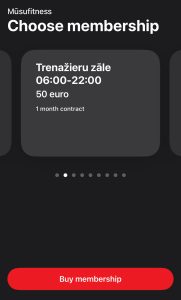
Choose your subscription
Choose the subscription that suits you be
Caution!
You can choose the start date of your subscription to be any day.
4.
Register
To register, you need to create your profile.
Fill in all the required information.
Register with your email address and set your password.
If you need invoice details, fill in the "I need company invoice" field.
5.
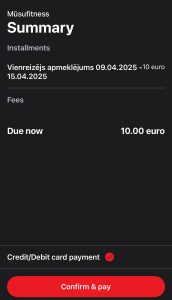
Pay for the subscription.
Enter your card details.
Click on "Confirm & Pay"
Make sure the payment has been processed.
Do not select another subscription if the payment has not been processed; instead, try again.
Caution!
Make sure the payment has been processed. If you see a red dot next to “my memberships,” it means the payment was unsuccessful. Select your current subscription and try making the payment again.
How to access the club?
Pēc veiksmīgas apmaksas, Jums būs aktīvs QR kods. Stingri aizliegts to nodot citām personām. Abonements ir paredzēts lietošanai vienam cilvēkam.
1.
Open QR code
Click on Entry tab in efitnessap application
2.
Scan QR code
To open the automatic barrier, hold your screen near the QR code scanner.
Caution!
Make sure your phone screen brightness is sufficient!
Keep track of your visits.
In the app, you can view your visit statistics.
Upon your request, we can prepare a visit report for insurance purposes.
To receive the report, please email: info@musufitness.lv.
The report will be prepared within 3 business days.
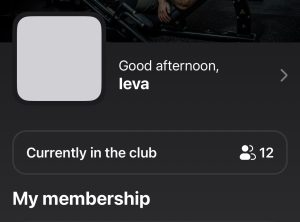
See the real-time visitor count.
Not a fan of large crowds? Check how many people are in the fitness club in real time.
Choose a time based on how many people are in the fitness club.
Please note that we do not track people when they leave. Each person is assigned a 2-hour time limit in the club.
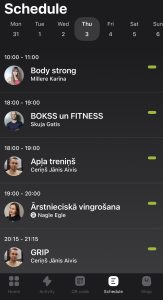
View the group class schedule.
In the app, you can sign up for group classes.
Read the class descriptions.
Pay attention to the group class cancellation policy.
If a group class is canceled, you will receive an email.